
Here's some insight about where SurveyGold is going and what drives us to get us there.

|
|
The Survey Author's Problem You are a survey author. You need to conduct a survey using multiple surveyors who will engage respondents in-person, face-to-face.
The SurveyGold Solution SurveyGold Mobile solves the problem of how to create and deploy a survey to a network of field surveyors. These field surveyors are your colleagues who use the free SurveyGold Mobile application to collect responses to your survey by engaging respondents in-person, face-to-face. Distributing the survey and collecting responses is a breeze. All you need to make this happen is the SurveyGold application and a Premium or Ultimate subscription. How You Use the SurveyGold Application
How Your Field Surveyors Use SurveyGold Mobile
Here is a profile of buyer criteria for institutions considering SurveyGold.
Due Diligence
Statement on vendor reputation, maturity in cloud applications and independent third-party assessments of vendor safeguards and processes. Vendor’s right to change the terms of use at any time and in any way without the permission of the user and frequently without notifying the user.
Regarding vendor safeguards and processes, in November 2015 SurveyGold changed to the HostingSource.com web hosting service for our web services, which are critical to the online features of any SurveyGold application. HostingSource.com is located in Secaucus, New Jersey, USA. Their data center is HIPPA compliant and employs a parallel, redundant, multi-tiered network architecture. All data links provide Tier 1 bandwidth. Their privacy policy meets all standards as set forth by U.S. Department of Commerce regarding the collection, use, and retention of personal information. This ensures excellent performance, up-time and data protection. Regarding our reputation, we have been serving a global customer base since 1999. We received a 9.5 out of 10 rating for three years in a row from the independent review site TopTenReviews and also have high ratings from CNET/Download.com where over 60,000 users have downloaded and used our SurveyGold application. We manage our support services pro-actively and have a high response rate to inquiries, with approximately 50% being responded to in one hour or less. To give you a lens into how widely used our SurveyGold application is, take a look at this representative sample of our customer list. Regarding our right to change the terms at any time, we have gone on record regarding our view of the data ownership and sacred trust. Simply said, if we blow that promise, we blow our brand. Trust is an essential part of our brand promise. We also have published website notices specific to SurveyGold software, documents and links as well as general legal notices. Exit Strategy
What is the exit strategy for disengaging from the vendor or service to fully delete all data from their service including distributed or back-up copies? How will we be able to recover our data from the vendor, especially in cases where the vendor shuts down.
The SurveyGold solution delivers the data to the SurveyGold application which records it in the SurveyGold database application...all of which reside on the survey author's computer. SurveyGold application users have access to this data forever, even if Golden Hills Software goes out of business. SurveyGold application licenses are perpetual, which means that they never expire, so you will never be locked out of the SurveyGold application. As part of normal practice, the SurveyGold application provides the ability to backup and restore the SurveyGold database using your own data storage solution (e.g., network folder, USB drive). So, the bottom line is that the SurveyGold solution puts you in possession of your data. Proportionality of Safeguards and Encryption of Data
Vendor statement on: privileged user access, data location, data segregation, data ownership, recovery/data availability, return of data, change management, user provisioning and de-provisioning, personnel practices, incident response plans, and investigative/management support.
Statement on encryption. Transmission of data to the vendor site must be encrypted. The data must also be encrypted at the vendor. Our Privacy Policy describes how we encrypt and secure all SurveyGold data. Refer to the topic entitled "How Do We Protect Your Information?". Our SurveyGold Online Services services manage, process and track your SurveyGold data. These services are built upon the world-class data center operating environment of our web hosting partner, HostingSource.com. All of our servers are actively monitored and regularly scanned to be compliant with PCI Security Standards.  
System Architecture
Please provide a system architectural diagram as to how your software works. For example, you mention the SurveyGold software on our computer. We need to know more details about any impact of your software on our computer devices and if it interacts with your cloud hosted app, etc.
SurveyGold Response This conceptual diagram of the SurveyGold solution describes the relevant details: SurveyGold application - (surveygold.exe) A Windows application that installs on the survey author's computer. It is a stand-alone application that uses HTTPS (Port 443) to interact with SurveyGold Online Services. SurveyGold interacts with Microsoft Word, if it is detected on the computer, for the purposes of publishing reports and producing surveys in Word format. There are no other interactions with the SurveyGold application except for the following: SurveyGold database application - (rteng9.exe) Sybase SQL Anywhere (SSA) is the database application that installs as part of the SurveyGold setup program. SurveyGold employs SSA for the purposes of securely and efficiently managing and tracking survey data. SurveyGold updater application - (update.exe) This application installs as part of the SurveyGold setup program. SurveyGold uses it to provide software updates. SurveyGold online services - A set of online services employed by the SurveyGold application and accessible via surveygold.com (IP address: 206.72.194.40) and surveygoldcloud.com (IP address: 206.72.194.52) for the purposes of publishing web surveys, collecting responses, acquiring SurveyGold application updates and other online features. An all-new SurveyGold User Guide is now available online. The entire contents of the user guide is searchable via the website search tool. The new user guide features updated screen shots, updated contents, links to video tutorials and more.
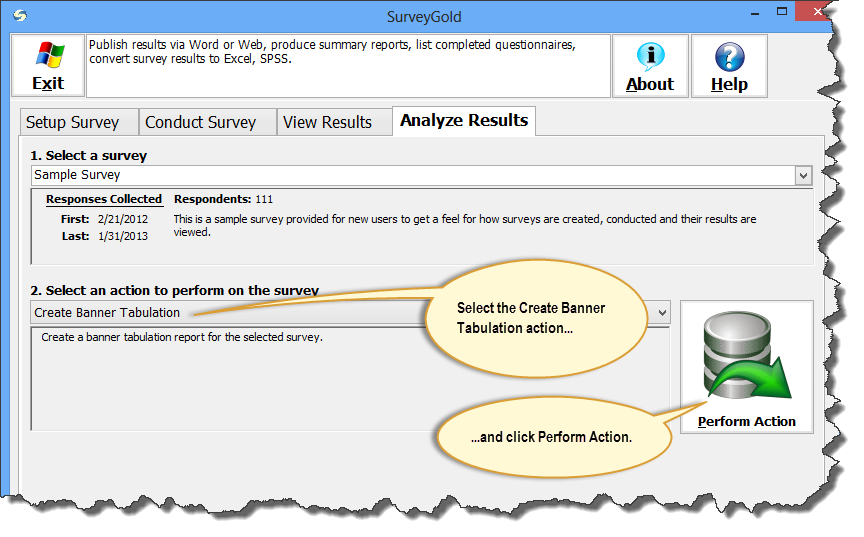
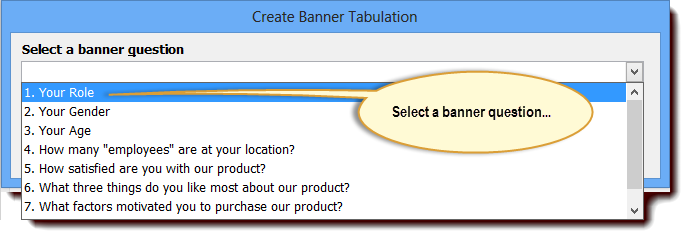
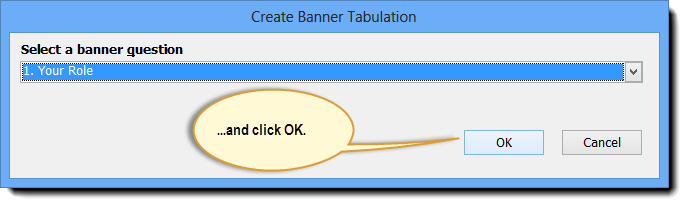
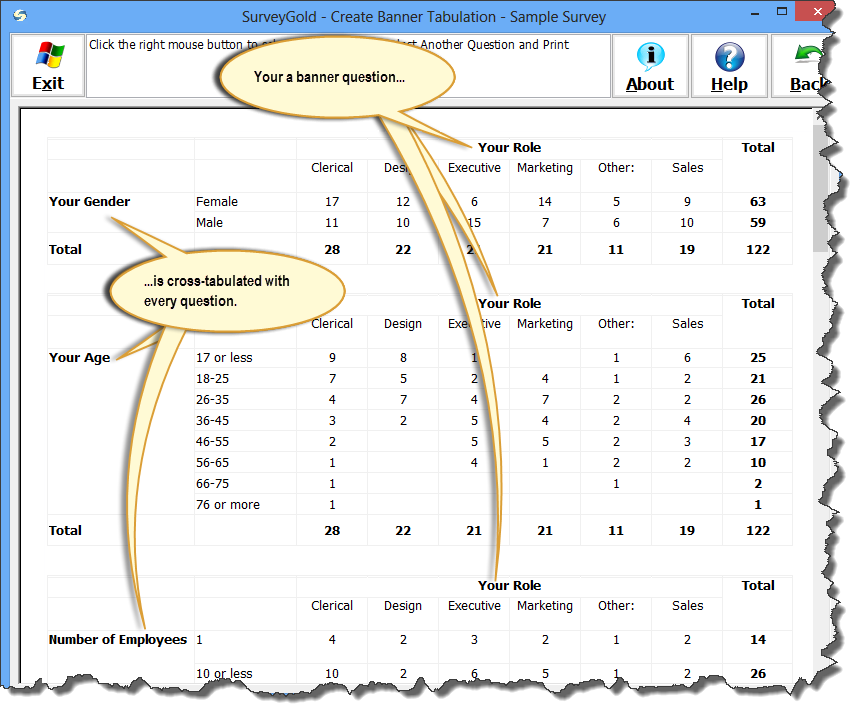
We just made an improvement to the SurveyGold online survey form. The submitted date and time recorded by SurveyGold is now based upon the current date and time of the respondent's browser. Simply said, the respondent's time zone is used when recording the date and time a online survey response is submitted. In the past, the submitted date and time recorded by SurveyGold was based upon our website's date and time. This software update is for online survey processing programs running on our website. That means that this update goes into effect immediately for all SurveyGold online surveys. No action is required on behalf of SurveyGold users in order to get the benefit of this update. SurveyGold garnered the Excellence Award for the second year year in a row according to a 2013 review of survey software by TopTenREVIEWS. SurveyGold also received a 9.5 out of 10 rating and was recognized as the "Best Intuitive Survey Software" We are not affiliated with TopTenREVIEWS in any way. It's humbling when someone else sings your praises. The complete review is available on the TopTenREVIEWS website. We just added a "Create Banner Tabulation" action in the Analyze Results tab. Simply select a banner question and SurveyGold produces a set of cross-tab charts for each and every question compared to the banner question. Many of you have been asking for this. We are glad to finally make it available to you. Woot! As always, SurveyGold users can acquire this software update immediately as follows:
In light of the recent news and uproar surrounding Instagram's updated terms of service describing their ability to sell photographs that are stored by users on their website, I thought it would be prudent and timely to remind you, our SurveyGold customers, of our position regarding the surveys and survey data that you collect, manage and track through the SurveyGold application and the surveygold.com, surveygoldplus.com and surveygoldcloud.com websites.
My intention in making this statement is not to stir up a hornet's nest of inquiry and suspicion. Rather, my intention it so assure our SurveyGold users around the world that we consider it a sacred trust to process and store your online surveys and survey response data. We will never, ever, ever violate that trust. This is the very foundation of our SurveyGold brand promise to you.
You've created an online survey using your SurveyGold application and for the longest time you have been the one responsible for collecting responses, performing analysis and reporting on results. The day has come when your job responsibilities have changed and you need to pass along responsibility of collecting responses of this online survey to another SurveyGold user in your organization so that they can take over your survey management responsibilities. If this describes your situation, the following guidance describes how to accomplish this. For the sake of this discussion, there are two people involved in this process and there are step-by-step instructions to follow for each person:
What the original survey owner Must Do:1) Remove your existing online survey from circulation This prevents anyone else from being able to respond to the online survey while you are in the process of transferring the survey. If the online survey is currently published on the SurveyGold website (because you used your SurveyGold application to publish your online survey):
In contrast, if the online survey is on your organization's website, remove the online survey from your website (or work with a webmaster to do so). 2) Collect the remaining online survey responses for your survey into your SurveyGold application This ensures that you have collected all responses for your online survey form prior to transferring ownership of the survey.
3) Export your survey and responses from your SurveyGold application into a survey definition file This makes it possible to transfer your survey and response data to another SurveyGold user.
4) Remove your survey from your SurveyGold application This permanently removes the survey and responses from your SurveyGold.
What the New Survey Owner Must Do:1) Import the survey definition file into your SurveyGold application This causes the survey and responses to be imported into your SurveyGold application.
2) Distribute the survey as an online survey form via your SurveyGold application This causes a new online survey to be created by and distributed by your SurveyGold application. Doing this ensures that any new responses submitted via the online survey form are collected into your SurveyGold application.
Tip: If your online survey form is accessed by a web link (URL) on an existing website that you manage, you should update the web link on your website (or work with a webmaster to do so) so that respondents are directed to the newly created online survey form. This is because the web link (URL) for the online survey form produced by your SurveyGold application is different than the original web link (URL) created by the original survey owner's SurveyGold application. Here are a few tips for working with the survey results collected in your SurveyGold application. For a Long-Running Survey Use a Date Range Filter Rather than Creating a New SurveyOne of the most common inquiries I receive pertains to how to manage long-running surveys. Specifically, many SurveyGold users are conducted assessments surveys over time so that can measure, for example, last year's results with this year's results. The solution that many SurveyGold users employ is to use the Copy Survey command in the Setup Survey tab to create a copy of last year's survey and just change the name slightly so that it becomes this year's survey. However, my recommendation is that you do not create a new survey, but continue to collect responses using the existing survey. Then you can use the date range filter feature in the View Results tab to view only the respondents from a particular time period such as last year. The benefit of this is that you can easily create a filter for last year and another filter for this year and then compare the two sets of respondents as multiple series in a single graph. This is not possible if you create two separate surveys and is only possible by using the date range filter from the entire set of long-running survey results. Check out our SurveyGold Tutorial channel for a brief show-and-tell video explaining how the filter feature works. If you are unable to access YouTube, the tutorial is also available on our website. Use a Chart Title to Eliminate Verbose Question Text in a Graph or ReportIt is often necessary to write a lengthy question in order to convey the intent of the question to the respondent. Later after the results have been collected and you begin to view results in graphs and/or reports, the lengthy question text results in visual clutter in those graphs and reports. The solution to this problem is not go back and change the question text from verbose to succinct. Rather, in this case I recommend that you use the chart title feature of SurveyGold that provides the ability for you to specify a more succinct chart title without changing the question text itself. You can change the chart title associated with a question in one of two ways:
Keep Question Response Choices as Terse as PossibleKeep in mind that any SurveyGold survey question that has choices (in other words, it is not a fill-in-the-blank question) appears as a graph in the View Results and Analyze Results graphs and reports. So, it helps to keep question response choices as terse as possible so as to avoid crowded or truncated graph labels and legends.
Even if you have a situation where you cannot avoid creating lengthy question response choices, it is possible for you to influence the way that the choices appear in a graph:
This makes the legend and label fonts as small as possible which makes the text that appears in the graph which makes the legends and text as small as possible thereby avoiding truncation of the response text or legend text in the graph. |

Chuck BoudreauAs the author of SurveyGold, it's my pleasure to serve and collaborate with the diverse community of SurveyGold survey authors, surveyors and respondents. Archives
October 2021
Categories
All
|

 RSS Feed